What
is Windows activation?
Activating Windows 7 installation is in a way registering Windows 7 operating system of yours
and making it legal.
Since Microsoft is keeping their rights on their various products including Windows products using the genius activation method, as a Windows 7 user, you should also activate Windows 7 copy of your own within a given period using one of different methods.
Since Microsoft is keeping their rights on their various products including Windows products using the genius activation method, as a Windows 7 user, you should also activate Windows 7 copy of your own within a given period using one of different methods.
Why
activating Windows 7 is important?
Microsoft operating systems had this
feature on Windows Vista editions as well as on Windows 7 editions with
different Windows 7 Build 's until its RTM release is published.
And windows activation which is not completed in the given period of time disables some Windows features and prevents you to use all properties of your system after the activation period.
Also you may not be able to update your system with the recent product updates from Microsoft.
So to make sure that you can benefit from all the features and enhancements of your Microsoft Windows 7 operating system, give priority to activate Windows7 as early as possible.
And windows activation which is not completed in the given period of time disables some Windows features and prevents you to use all properties of your system after the activation period.
Also you may not be able to update your system with the recent product updates from Microsoft.
So to make sure that you can benefit from all the features and enhancements of your Microsoft Windows 7 operating system, give priority to activate Windows7 as early as possible.
If you have already tried to
activate Windows 7 copy, but failed and getting "This copy of Windows 7 is
not genuine" warning then you can refer to Windows 7 troubleshoot article for possible solution suggestions.
Let's continue with Windows 7
activate process steps.
How to Activate Windows 7 manually?
If you did
not activate Windows 7 during your Windows 7 installation, you can start
activating Windows 7 manually.
You can see for Windows 7 activation you have limited time to complete activating Windows 7 installation.
You can see how much time remaining for you to activate Windows7 for different Windows 7 Build numbers when you open the System control panel screen at the bottom of the panel view.
You can see for Windows 7 activation you have limited time to complete activating Windows 7 installation.
You can see how much time remaining for you to activate Windows7 for different Windows 7 Build numbers when you open the System control panel screen at the bottom of the panel view.
To open the
below System Control Panel screen, you can open the Control Panel, then select
System and Security menu item and select the System control panel view.
If you have
not activated Windows 7 Ultimate Edition after you have installed your Windows
7 operating system, you will see the Windows activation section at the bottom
of the Control Panel screen.
When you have an online internet connection, you can start activating Windows process manually by clicking the "Activate Windows now" link.
When you have an online internet connection, you can start activating Windows process manually by clicking the "Activate Windows now" link.

On the
Windows Activation screen in order to activate Windows 7 Build 7000 for
instance, you are reminded how many days are there still for activating Windows
7 Ultimate RC operating system.
Activating Windows 7 will enable you to use all Windows features after the activation period is ended.
So to make sure, if you have an active online internet connection, go on for next steps by selecting the option "Activate Windows online now".
Activating Windows 7 will enable you to use all Windows features after the activation period is ended.
So to make sure, if you have an active online internet connection, go on for next steps by selecting the option "Activate Windows online now".

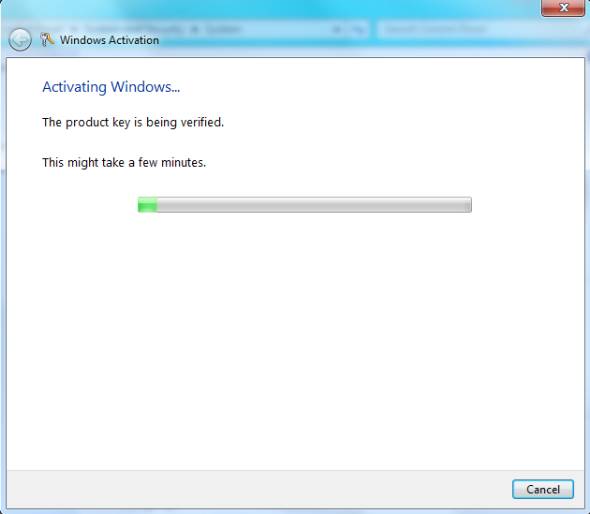
This screen
displays the message to the user about the product key that is being verified.
So if the activation can connect to Microsoft via internet connection and
manages to validate the product key without any problem you will be redirected
to the last screen of the Windows Activation wizard.
This is the activation step the question of "How to register Windows 7" is answered.
If the system cannot reach to the internet due to network errors or a valid internet connection, you will be prompted to define and build an internet connection.
This is the activation step the question of "How to register Windows 7" is answered.
If the system cannot reach to the internet due to network errors or a valid internet connection, you will be prompted to define and build an internet connection.
In the below
screen Windows 7 users can see the result of a successful Windows activation.
It is stated that your copy of Windows is verified and with a valid copy of Windows 7, you are eligible to receive all available updates and product support from Microsoft.
It is stated that your copy of Windows is verified and with a valid copy of Windows 7, you are eligible to receive all available updates and product support from Microsoft.

As you can
see in the above explained steps Windows 7 activation is simple and
straight-forward unless you have a valid copy of Windows 7.
Generally you will not face a problem during Windows 7 activation of your Windows copy.
If you experience a problem while trying to register Windows 7 via activation, then you can call the Microsoft Support phones or start activation using phone procedure and talk to a support engineer to help you with your Windows 7 activation problem.
Generally you will not face a problem during Windows 7 activation of your Windows copy.
If you experience a problem while trying to register Windows 7 via activation, then you can call the Microsoft Support phones or start activation using phone procedure and talk to a support engineer to help you with your Windows 7 activation problem.
share the post to your friends and enjoy.